Build an FMEA slide in PowerPoint where RPN color-coding survives a resort or a newly discovered failure mode — not just the first draft.
A quality engineer at a mid-size plastics manufacturer ran an FMEA on an injection-molding line with her process team one Thursday afternoon — eight failure modes, each scored for severity, occurrence, and detection — then flagged the row that looked scariest, a weld-line crack under load, in red before pasting the table into a PowerPoint slide for Monday's steering committee. The scariest-looking row and the highest-risk row turned out to be two different rows, and nobody caught it until a plant manager asked why a failure mode with nearly double the RPN of the "critical" one sat in a plain white box. An FMEA slide in PowerPoint is a table of failure modes with Severity, Occurrence, and Detection scores, a computed Risk Priority Number, and color bands keyed to a threshold — and the part most templates skip is that none of it recalculates on its own. Color a row by eye instead of by the number, and PowerPoint holds that color exactly where you put it, no matter what the numbers do next.
What an FMEA Slide Actually Has to Carry
Failure Mode and Effects Analysis isn't a slide convention invented for consulting decks — it's a 1949 U.S. military procedure (MIL-P-1629) for finding failure points in equipment before they happened, picked up by NASA for the Apollo program in 1963, and pulled into Ford's and GM's quality systems through the 1970s as the automotive industry's own supplier-defect problems grew too large to catch by inspection alone. By the time AIAG folded FMEA into its automotive quality standards in the 1990s, the method had settled into the format that still shows up on every FMEA slide today: a failure mode, its effect, its cause, the current controls, and three 1-to-10 ratings — Severity (how bad the effect is if it reaches the customer), Occurrence (how likely the cause is to happen), and Detection (how likely current controls are to catch it before it ships, scored backwards: 1 means controls will almost certainly catch it, 10 means there's no way to catch it at all). Multiply the three and the Risk Priority Number lands anywhere from 1 to 1,000.
None of that is specific to PowerPoint. What is specific to PowerPoint is what happens to those RPN numbers once they leave the FMEA workbook and have to read as a single slide: which rows get flagged, in what order they sit, and what happens to both of those decisions the next time anyone touches the table.
The Case: A Table That Looked Right Until the Team Added Two Rows
Back to the plastics line. The process team's first pass covered eight failure modes on a bracket-molding process, and the table below is close to what the engineer pasted into the deck — unsorted, in the order the team walked the process, with only the weld-line crack row shaded red because, on a quick read, a severity of 8 looked like the thing to worry about most. Two more rows, added the following week after a customer complaint surfaced a pair of related defects, sit at the bottom, never checked against anything.
| Failure Mode | S | O | D | RPN |
|---|---|---|---|---|
| Short shot (incomplete fill) | 7 | 4 | 3 | 84 |
| Warping after ejection | 5 | 6 | 4 | 120 |
| Flash at parting line | 3 | 7 | 2 | 42 |
| Sink marks on visible face | 4 | 5 | 5 | 100 |
| Weld-line crack under load | 8 | 3 | 6 | 144 |
| Color streaking | 2 | 4 | 2 | 16 |
| Dimensional drift (mold wear) | 6 | 5 | 7 | 210 |
| Burn marks (gas trap) | 3 | 3 | 4 | 36 |
| Knit-line delamination (added wk 2) | 7 | 4 | 5 | 140 |
| Sprue brittleness, cold storage (added wk 2) | 4 | 2 | 3 | 24 |
RPN is Severity times Occurrence times Detection, so the weld-line crack's 8 x 3 x 6 comes to 144 — a real number, worth attention, but not the biggest one on the sheet. Dimensional drift from mold wear scores lower on severity (6) but higher on both occurrence (5, because the mold had already shown wear on a prior run) and detection (7, because the drift is gradual and the in-process gauge check only catches it intermittently); multiplied out, it lands at 210, the actual highest RPN in the whole table, sitting in a plain white row because nobody ran the multiplication before reaching for the highlighter.
Common mistake: coloring a row because its severity score is the biggest number on the sheet. Severity alone answers "how bad would this be," not "how much should we worry about it relative to everything else on this table" — that second question is what RPN, or a proper Action Priority rating, is for, and it only works if someone actually runs the multiplication before picking up a highlighter.
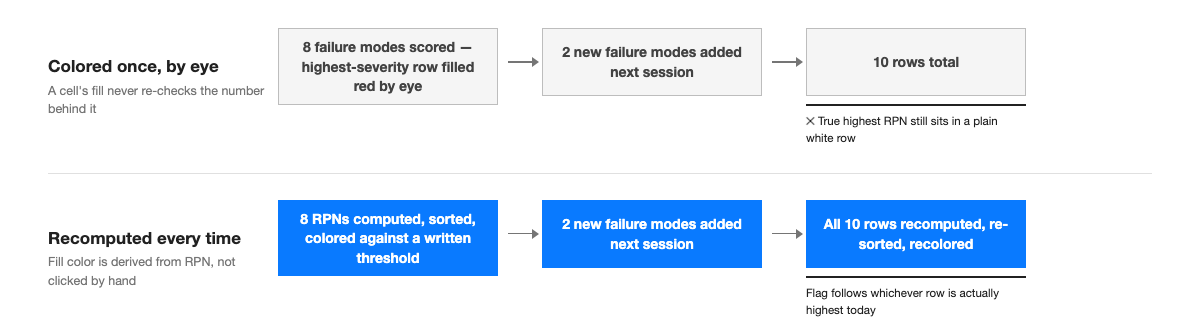
The table got worse, not better, the following week. The steering committee asked the team to also score two failure modes that had surfaced in a separate customer complaint — a knit-line delamination (RPN 140) and sprue brittleness in cold storage (RPN 24) — and the team added both as new rows at the bottom before the next review. That's a reasonable way to extend an FMEA table. What didn't happen is any recheck of the eight original rows against the two new ones. Nobody un-flagged the weld-line crack, because nobody was looking at it anymore; attention was entirely on the two additions. By the second steering committee, the slide had ten rows, one wrongly flagged on severity alone, the true highest-RPN row still blank, and a newly added delamination row (RPN 140) sitting closer to "worth flagging" than four of the originally unflagged rows above it — none of which anyone revisited.
What's Actually Broken Here
The mistake isn't that the engineer made one bad judgment call. It's that PowerPoint gave her nowhere to put a rule instead of a judgment call. A cell's fill color in a PowerPoint table is a static property, set the moment someone clicks Fill Color and left exactly where it was clicked — it is not a function of what's typed into that cell, and it does not re-evaluate when a number changes, a row gets added, or the table gets sorted. Excel's conditional formatting is the opposite: a rule like "fill red if this cell is at least 150" re-checks itself every time the underlying value changes, which is the entire reason spreadsheets are the right home for a live FMEA and PowerPoint tables are not. Paste a conditionally-formatted Excel range into PowerPoint as a native table rather than a picture, and the colors come across as whatever they happened to be at that instant — then freeze, the same way a manually-clicked fill does, the moment the paste completes.
That single fact explains both failures in the plastics example. The first flag was wrong because a human picked a row by eye instead of computing the number the slide claims to be color-coding. The second failure — a stale flag surviving two new rows and a full review cycle — happened because nothing on the slide ever prompts anyone to recheck an old row; the only rows that get attention after an edit are the ones that just changed, and a table with no live formatting has no way to surface the ones that should have changed color but didn't.
Common mistake: treating color-coding as a one-time formatting pass done right before the slide ships, rather than a check that has to re-run across the full table every time anything on it changes — including the rows nobody just touched.
Building the Table So the Color Actually Means the Number
Fix the plastics example and the sequence looks almost boring, which is the point. Compute RPN for every row first — all ten, not just the two that just got added — before anyone opens the fill-color menu. Decide the thresholds once, in writing, before looking at which rows they'll flag: this team settled on High at RPN 150 and above, Medium from 60 to 149, Low below 60, numbers chosen to match the plant's existing corrective-action workflow, not because they're universal — a different plant, a different industry, or a stricter quality system might reasonably draw the lines elsewhere (more on that below). Sort the rows by RPN, highest to lowest, which does half the communication work before a single cell gets colored: a reader scanning top to bottom sees risk descending, with or without color.
Color only the RPN cell itself, not the row behind it. A Balanced Scorecard slide runs into the identical choice with its RAG status column, for the same reason: a solid-color row buries the three numbers that explain why it's red, and on a ten-to-fourteen-row FMEA table, a column of saturated red and amber blocks reads as alarming before it reads as informative. A narrow fill on the RPN number — or a thin colored bar in a dedicated column next to it — keeps Severity, Occurrence, and Detection sitting in plain type where a reader can check the math, while the one number that matters for triage still jumps out.
Common mistake: shading the whole row anyway because a half-colored table looks unfinished next to a fully-colored one — a cosmetic instinct that actively fights the slide's job, which is letting someone compare the inputs, not just read the verdict.
| Failure Mode | S | O | D | RPN |
|---|---|---|---|---|
| Dimensional drift (mold wear) | 6 | 5 | 7 | 210 |
| Weld-line crack under load | 8 | 3 | 6 | 144 |
| Knit-line delamination | 7 | 4 | 5 | 140 |
| Warping after ejection | 5 | 6 | 4 | 120 |
| Sink marks on visible face | 4 | 5 | 5 | 100 |
| Short shot (incomplete fill) | 7 | 4 | 3 | 84 |
| Flash at parting line | 3 | 7 | 2 | 42 |
| Burn marks (gas trap) | 3 | 3 | 4 | 36 |
| Sprue brittleness, cold storage | 4 | 2 | 3 | 24 |
| Color streaking | 2 | 4 | 2 | 16 |
Sorted by RPN, colored by this team's own key: High ≥150, Medium 60–149, Low <60. Only one row actually clears the High bar — and it isn't the one severity alone would have picked.
The part that actually prevents the plastics team's second failure is the last one: every time the table changes — a new failure mode, a rescored row, a deleted one — recompute and recolor the entire table, not a diff against whatever just changed. That's tedious enough by hand that the practical fix is sequencing, not willpower: keep the live, scored FMEA in Excel, where conditional formatting recalculates automatically every time a row is touched, and treat the PowerPoint table as a finished export of whatever that sheet says right now — paste values, not a formula-linked range, re-sort, and reapply the color key fresh each time, rather than editing the PowerPoint table directly and hoping the old fills still line up. Advisio, listed on Microsoft AppSource, builds this as a native PowerPoint table that recomputes the color key from the RPN value every time a row is added, removed, or rescored, so the weld-line crack row and the dimensional-drift row end up colored by what they actually are, not by which one got clicked first.
Common mistake: re-coloring only the rows that were just added or edited, on the reasonable-sounding theory that the old rows "already got checked." They got checked against a threshold and a row count that no longer exist once anything else on the table changes.
The Same Mechanics on a Different Floor: An IT Deployment FMEA
None of this is specific to injection molding. A platform team running an FMEA on a deployment pipeline hits the same wall from a different direction. "Config drift between staging and production" might score S6, O7, D6 (RPN 252); "a flaky integration test blocks a safe deploy" might score S4, O8, D3 (RPN 96); "a secrets-rotation job silently fails" might score S9, O2, D8 (RPN 144). Three failure modes, three different risk profiles, and the same trap waiting: flag "config drift" because it's the one everyone remembers from the last incident review, leave "secrets rotation" unflagged because a severity of 9 doesn't register as urgent next to a bigger-looking number elsewhere, and have the actual highest-risk row end up the right color for the wrong reason — luck, not the multiplication.
The fix carries over exactly. Compute all three RPNs before touching the fill-color menu. Agree on the platform team's own thresholds — a security-adjacent team will often set its High bar lower than a manufacturing line would, because a severity of 9 on a secrets failure is a different kind of consequence than a severity of 9 on a cosmetic defect. And recheck every row, not just the one from this week's postmortem, the next time a new failure mode gets added after the next incident. A twelve-row platform FMEA and an eight-row injection-molding FMEA break the same way, for the same reason, because the thing that's actually broken is a PowerPoint table's total lack of memory, not anything about plastics or deployments specifically.
Picking Thresholds, and Where the Real FMEA Should Live
There's no single correct RPN cutoff for "High," and that's by design, not an oversight the industry forgot to fix — a 150 cutoff that's appropriately strict for a safety-adjacent automotive part would flag almost nothing on a lower-stakes internal process, and a looser cutoff tuned for that internal process would wave through genuinely risky combinations on the automotive line. Pick a threshold that matches whatever corrective-action workflow the color is meant to trigger, write it down next to the table as a visible key, and change it deliberately rather than letting it drift because nobody remembers what "High" was supposed to mean six months ago.
Raw RPN has a second, better-known problem on top of the no-universal-cutoff issue: the multiplication can land on the same number from very different combinations of inputs, and a high-severity, low-occurrence failure can end up with a lower RPN than a trivial, frequent one — even though most engineers would rather see the dangerous-but-rare failure flagged first. That critique is well-documented enough that AIAG and VDA's jointly published 2019 FMEA handbook replaced RPN-based prioritization with an Action Priority table for new analyses — a High/Medium/Low rating that weighs Severity first, then Occurrence, then Detection, specifically so a high-severity failure can't get buried under a merely high-occurrence one. Nothing about the PowerPoint mechanics above changes if a team uses Action Priority instead of raw RPN — the color key is still computed from a value, not chosen by eye, and it still has to be rechecked against the whole table every time a row changes. Only the formula behind "what counts as High" is different.
Whichever scoring method a team uses, the FMEA itself — the scored document with its revision history and sign-offs — belongs in Excel or whatever quality management system the plant already runs, not in the PowerPoint deck. The slide is a snapshot built for one specific audience and one specific meeting: usually the top eight to twelve rows by RPN or Action Priority, not all forty-plus failure modes the full analysis actually covers. Route anything below that cut to an appendix slide rather than shrinking the font to fit every row into one view — a ten-row table a steering committee can actually read is more useful than a thirty-row table nobody will.
FAQ
What RPN threshold should I use to color-code an FMEA slide?
There isn't a universal number — teams commonly draw the "High" line somewhere between 100 and 200, but the right cutoff depends on what corrective-action process the color is meant to trigger. Pick one before building the table, write it on the slide as a visible key, and apply it to every row the same way.
Should the RPN color-coding fill the whole row or just one cell?
Just the RPN cell, or a narrow colored bar next to it. A solid-color row on a ten-plus-row table buries the Severity, Occurrence, and Detection numbers that explain the verdict — the same mistake a Balanced Scorecard's RAG column runs into if it shades entire KPI rows instead of a dedicated status cell.
Should the FMEA live in Excel or in the PowerPoint slide?
In Excel, or in whatever quality system the team already uses for sign-offs and revision history. PowerPoint tables have no conditional-formatting engine, so nothing on a PowerPoint FMEA recalculates when a row changes — keep the live analysis in the spreadsheet and treat the slide as a periodically refreshed export of the current top risks.
How many failure modes should actually go on one FMEA slide?
Usually the top eight to twelve by RPN or Action Priority — enough to show the committee what's driving the risk without forcing a font size that makes the numbers unreadable. Send the rest to an appendix slide rather than fitting all of them onto one crowded table.
RPN or AIAG-VDA Action Priority — which one should the slide use?
Either, as long as the team has agreed on one and applied it consistently. Action Priority (High/Medium/Low) fixes a known weakness in raw RPN — a high-severity, low-occurrence failure no longer gets buried under a merely frequent, low-severity one — but it doesn't change how the slide itself needs to be built: color still has to be computed from a value and rechecked every time the table changes.