Build a 5 Whys root cause analysis slide in PowerPoint that holds its shape when the questioning splits into two or three causes, not one straight chain.
A plant manager's team spent forty minutes on a whiteboard tracing why last week's output had dropped, and by the third "why" the explanation had already split in two: one shift blamed a changeover procedure nobody had actually standardized, the other pointed at a parts shortage that traced back to a supplier delay. The facilitator photographed the whiteboard to turn into a slide that night. Rebuilding it in PowerPoint is where the trouble started — not because the content was unclear, but because the questioning hadn't stayed on one track, and every 5 Whys template downloaded that evening assumed it would.
A 5 Whys slide in PowerPoint is a problem statement box followed by a chain of linked "why" boxes ending in a root cause. That only needs five boxes in a straight line when the evidence genuinely points to one causal path. The moment an answer splits into two explanations — which happens constantly in real root-cause sessions — the slide needs independent branches that can run to different depths and still connect back to a single problem box, not five equal boxes forced into one lane. Everything below covers building both versions, and the branching one specifically, directly in PowerPoint.
What a 5 Whys Slide Actually Has to Show
Most 5 Whys templates sold online — and most of the first page of search results for this exact topic — show the same thing: five rectangles in a row, or five rungs of a ladder, each one slightly offset from the last, connected by a single arrow. That shape is correct for exactly one kind of root-cause session: the kind where every "why" has one clean answer. The classic version of this, documented by Toyota's Taiichi Ohno and still the most-cited worked example of the method, runs in a single chain: a machine stopped because a fuse blew from overload; the overload traced to a bearing that wasn't lubricated; the lubrication failure traced to a pump that wasn't circulating oil; the pump failure traced to a worn pump shaft; the worn shaft traced to the absence of a strainer that would have kept metal shavings out. Five whys, one line, one root cause. A straight five-box slide represents that case honestly.
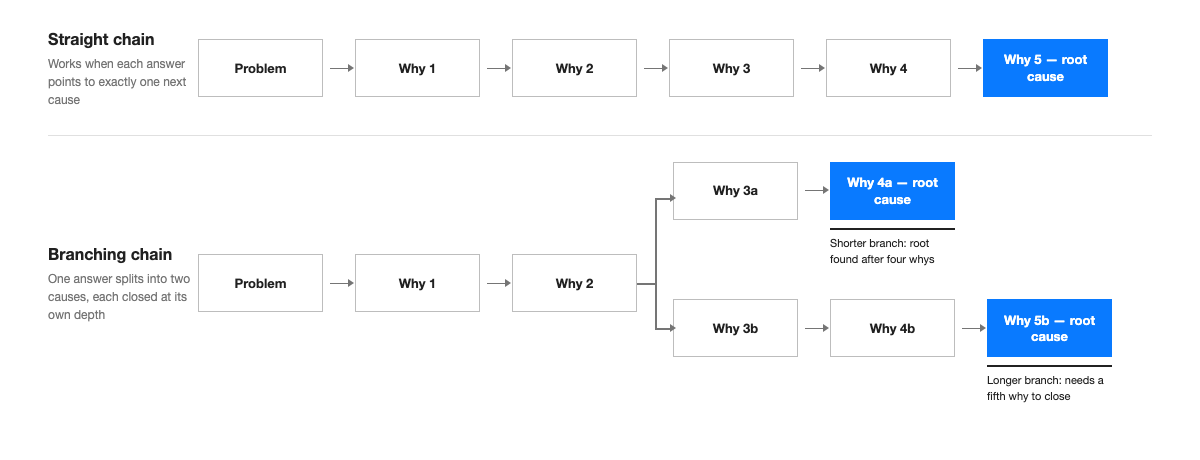
What it doesn't represent honestly is the far more common case where the second or third "why" doesn't have one answer — it has two, and sometimes the two causes warrant different amounts of digging before either one resolves into something fixable. The figure below shows the shape difference. The left side is the straight chain a standard template assumes. The right side is what the slide actually needs to look like once a why splits: a shared trunk up to the point of divergence, then two (or more) branches that close at whatever depth each one actually needs.
Step 1: Write a Problem Statement That Can't Drift
Every box downstream of the problem statement inherits whatever vagueness is baked into it, so this is the step worth spending the most care on relative to how little text it produces. A workable problem statement names the metric, the direction, the size, and the timeframe: not "output dropped" but "Line 3 output fell 12% in the week of October 6 versus the prior four-week average." Put it in a single box at the top or left edge of the slide, sized wide enough to hold the full sentence without wrapping into more than two lines — a problem box that wraps to four lines signals a statement that's trying to describe two problems at once, which is usually the first sign that the chain below it is going to want to branch.
Common mistake: writing the problem statement as the symptom's symptom — "customers are unhappy" instead of "on-time delivery rate fell from 96% to 84% in September" — which gives the first "why" nothing concrete to interrogate and produces an answer that's really just a restatement of the complaint.
Steps 2–3: Ask Why Until the Chain Forks
Each subsequent box answers "why" about the box before it, not about the original problem statement — a frequent slide-building error is writing every answer as a fresh take on the root problem instead of a direct response to the immediately preceding box, which produces five boxes that all restate the same observation in slightly different words rather than a chain that actually descends. Keep each box to one sentence stating a cause, not a question, and keep box width consistent across the whole chain so the slide reads as one structure rather than a collection of different-sized ideas glued together.
The fork usually shows up here, at why two or three, and it looks like this in practice: the plant manager's team got "output fell 12%" to "changeovers on Line 3 ran long that week" without disagreement. The next "why" is where the room split. Half the team said changeovers ran long because the new operator on nights hadn't been walked through the updated sequence. The other half said changeovers ran long because a fastener kit was out of stock and the line had to pause mid-changeover to source one from another line — a logistics issue with nothing to do with training. Both were true for different changeover events that same week. That's the fork, and it's the point where a single-lane template starts actively distorting the slide: forcing both explanations into one box ("training and parts issues") erases the fact that they're two separate root causes needing two separate fixes, while picking one and dropping the other understates the problem.
Common mistake: noticing the fork during the whiteboard session but merging it back into one box anyway when building the slide, because a two-branch layout looks harder to lay out neatly than a tidy five-box row. The fix isn't in the whiteboard session — it's in treating the branch as a layout problem to solve, covered next, rather than a reason to flatten the finding.
Step 4: Give Each Branch Its Own Depth
Once a why splits, duplicate the chain from that point forward into two parallel rows, each starting from a copy of the box where the split happened — in the example, two "changeover ran long" boxes, one feeding into the training branch and one into the parts branch. Continuing the case: the training branch needed one more why ("why hadn't the new operator been walked through the sequence" → "the updated sequence sheet was never added to the onboarding checklist") and closed in four boxes total. The parts branch needed two more whys ("why was the fastener kit out of stock" → "the reorder point in the inventory system was set for the old kit size" → "the reorder point wasn't updated when the kit was redesigned six months earlier") and closed in five. That asymmetry is normal and is exactly what the slide should show — not padding the shorter branch with a filler box to make both rows the same length, and not truncating the longer branch early just to match.
The part that actually breaks most PowerPoint builds here isn't the content, it's the connectors. A shared trunk feeding two branches of different lengths means the branch point needs a connector that splits into two lines at different angles, and every box after that point needs to stay aligned to its own row without drifting out of line with the row above or below it as boxes get nudged during editing. Native PowerPoint connectors (Insert → Shapes → Elbow Connector, or the connector points that appear when hovering a shape's edge) keep a line attached to two shapes even if one moves — glued text boxes with a straight line drawn between them don't, and that's usually why a branching 5 Whys slide that looked fine in the first draft shows disconnected arrows by the third round of edits.
Common mistake: drawing the branch connectors as static lines instead of using PowerPoint's connector tool, which means every later edit to box position requires manually redrawing the lines that now point at the wrong spot.
Step 5: Close Every Branch at a Real Root Cause, Not a Symptom
A branch is done when the answer is something the team can actually act on — a process, a system setting, a missing check — not when five boxes have been filled in. "The reorder point wasn't updated when the kit was redesigned" is actionable: someone can fix the reorder point and add a step to the redesign checklist. "The parts weren't available" is not a root cause; it's a restatement of an earlier box in slightly different words, and a branch that lands there needs at least one more why. The fastest check for this on a finished slide: read only the last box in each branch out loud, with nothing else, and ask whether it describes something fixable. If the answer is another symptom, the branch isn't finished, regardless of how many boxes it already has.
A note from experience: at a global consulting firm, I sat through a root-cause workshop where a team closed a branch at "the vendor missed the SLA" and moved on, satisfied, because that was technically the fourth "why" and the template on the wall had four rows. Nobody asked why the vendor missed the SLA — whether it was a one-off, a contract gap, or a pattern across three other accounts. The slide looked finished. The actual root cause, a contract that had never specified a penalty clause, came out in a follow-up session two weeks later, after the same failure happened again. A branch closes when the answer is actionable, not when the row count matches the template.
5 Whys or Fishbone? Choosing Before You Build the Slide
Branching 5 Whys and a fishbone (Ishikawa) diagram solve related but different problems, and picking the wrong one produces a slide that fights its own content no matter how carefully it's built. 5 Whys — including the branching version above — is the right tool when the team can trace one or a small number of causal chains from symptom to cause; it answers "what sequence of events led here." A fishbone diagram is the right tool when the real task is breadth, not depth: surfacing every plausible contributing factor across categories like people, process, equipment, and materials before anyone has committed to a single explanation. In practice, a two-branch 5 Whys like the changeover example above is still a 5 Whys slide — two chains is manageable as parallel rows. Once a session surfaces four or five plausible root-cause directions rather than two, it's usually a sign the investigation is still in the breadth phase and belongs on a fishbone diagram first, with 5 Whys applied afterward to whichever one or two branches the fishbone session flags as most likely. For the breadth-first version of this same problem, the fishbone diagram slide guide covers building that category-based layout, including the same uneven-branch-length issue from the other direction — categories with very different numbers of contributing factors.
Finishing Checklist Before the Readout
- Problem statement names a metric, direction, size, and timeframe — not a general complaint
- Every box answers "why" about the box directly above or before it, not about the original problem
- Branches are only present where the evidence actually split; nothing was forced into one lane or artificially separated to look tidy
- Each branch's final box describes something a team can act on, read aloud with no other context
- Branches are allowed to end at different depths — nothing was padded or truncated to match row counts
- Connectors are PowerPoint connector objects attached to shape edges, not static lines, so moving a box doesn't leave a disconnected arrow
- Box width and spacing are consistent within each row, so uneven branch lengths read as "the investigation went deeper here," not as sloppy alignment
Where the Same Branching Problem Shows Up Again
The manufacturing changeover case above is one version of a pattern that recurs across functions: a customer-complaint root cause where "the shipment arrived late" splits into a warehouse-staffing branch and a mislabeled-SKU branch at different depths; a software incident postmortem where "the deploy failed" splits into a configuration-drift branch and a missing-test-coverage branch; a project-delay review where "the milestone slipped" splits into a scope-creep branch and a vendor-dependency branch. In every one of these, the mechanics from Steps 4 and 5 — duplicate the chain at the fork, let each branch run to its own depth, use real connectors — carry over directly. The same branching challenge, just drawn with the problem at the top instead of the left, shows up in issue tree slides, where a single issue splits into sub-issues that also need to close at different depths without the layout collapsing when a branch gets added after the first workshop.
That's also the specific point where Advisio, listed on Microsoft AppSource, is built to help: it generates the branching chain as native, editable PowerPoint shapes with connectors that stay attached to their boxes, sizing each branch to however many whys it actually needed — so a two-branch root cause this week that turns into a three-branch one next week, after a follow-up session finds another contributing cause, is an added row, not a redrawn slide.